Engineers see regression as drawing a line through points. Statisticians see it as separating signal from noise — and that framing changes what you can learn from a model.
Author
Matthew Gibbons
Published
31 January 2026
If you’ve ever used a least-squares fit to draw a trend line through data, you already know the mechanics of regression. numpy.polyfit, a scatter plot, a line that minimises the distance to the points. Most engineers can set this up in a few minutes. The mechanics are correct. The mental model that comes with them usually isn’t.
The curve-fitting instinct says: find the function that best matches the data. Regression asks a different question: what systematic relationship exists between these variables, and how much variation is left unexplained? The first framing cares about the line. The second cares just as much about the gaps between the line and the data. That shift in attention — from the fit to the residuals — is where regression becomes a tool for understanding, not just prediction.
The decomposition you didn’t notice
Imagine you’re investigating API performance. You suspect that response time increases with payload size, and you have a few weeks of production logs to work with. The engineering instinct is to plot the data, fit a line, sanity-check it, and move on. That instinct is sound. But watch what the fit actually computes:
import numpy as npimport matplotlib.pyplot as pltrng = np.random.default_rng(42)# Simulated production logs: payload size vs response timen =40payload_kb = np.sort(rng.uniform(10, 200, size=n))true_intercept =20# base latency, mstrue_slope =0.8# ms per KBnoise = rng.normal(0, 15, size=n)response_ms = true_intercept + true_slope * payload_kb + noise# Fit a linear modelcoeffs = np.polyfit(payload_kb, response_ms, 1)fitted = np.poly1d(coeffs)# Pick five points to annotatehighlight = [4, 12, 22, 30, 37]fig, ax = plt.subplots(figsize=(10, 5))fig.patch.set_alpha(0)ax.patch.set_alpha(0)ax.scatter(payload_kb, response_ms, color='#0072B2', alpha=0.6, s=30, zorder=3)x_line = np.linspace(payload_kb.min(), payload_kb.max(), 200)ax.plot(x_line, fitted(x_line), color='#E69F00', linewidth=2, label='Fitted line (signal)')for i in highlight: y_hat = fitted(payload_kb[i]) ax.plot([payload_kb[i], payload_kb[i]], [y_hat, response_ms[i]], color='#D55E00', linewidth=1.5, linestyle='--', alpha=0.8) ax.scatter(payload_kb[i], response_ms[i], color='#0072B2', s=60, zorder=4, edgecolors='#D55E00', linewidth=1.5)ax.plot([], [], color='#D55E00', linewidth=1.5, linestyle='--', label='Residual')ax.set_xlabel('Payload size (KB)')ax.set_ylabel('Response time (ms)')ax.set_title('Regression decomposes each observation into signal and residual')ax.spines['top'].set_visible(False)ax.spines['right'].set_visible(False)ax.yaxis.grid(True, linestyle=':', alpha=0.4, color='grey')ax.set_axisbelow(True)ax.legend(loc='upper left', framealpha=0.0)plt.tight_layout()plt.show()
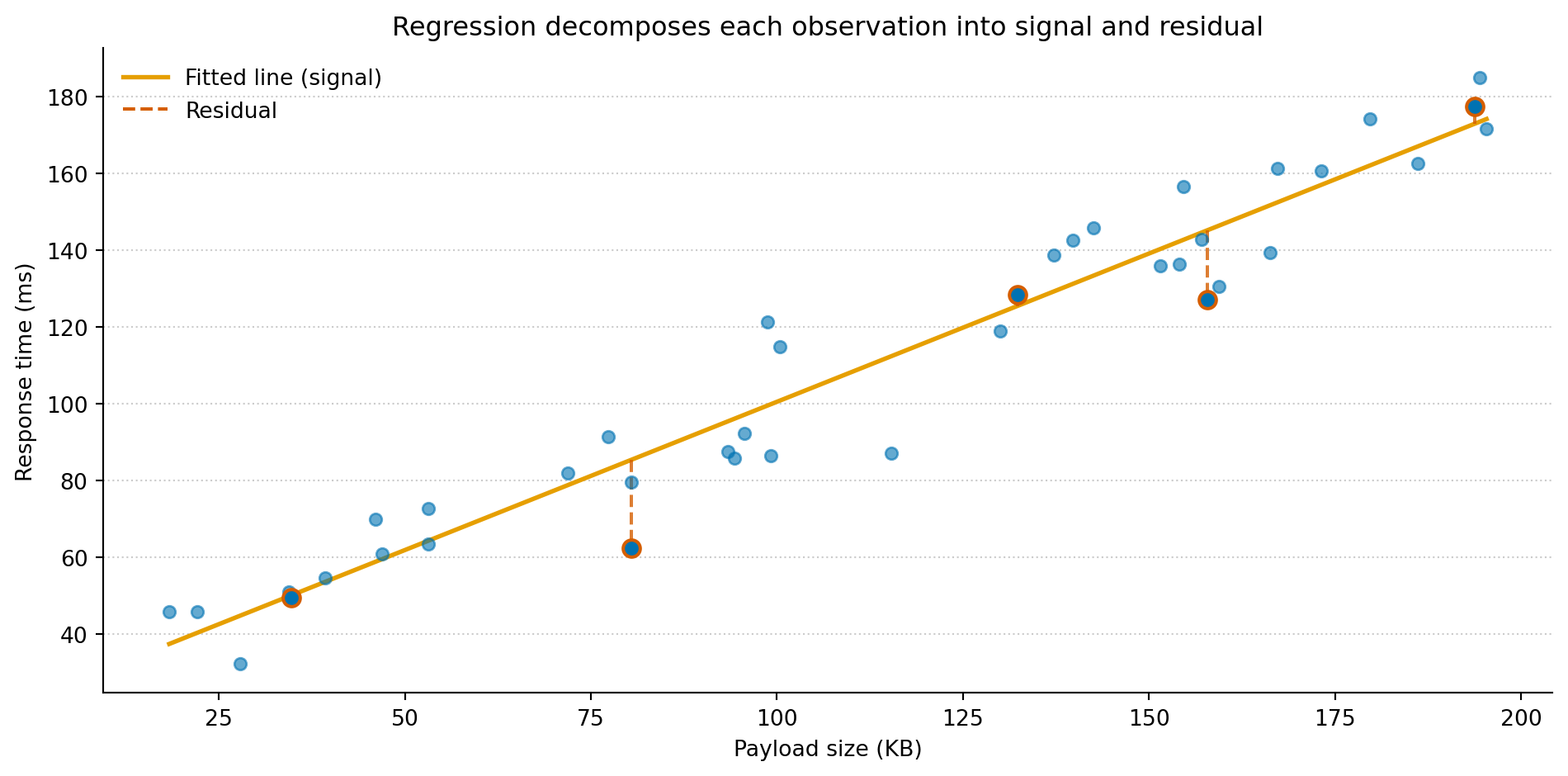
Figure 1: Every observation decomposes into a fitted value (on the amber line) and a residual (the dashed red segment). The line is the model’s claim about the systematic relationship. The residuals are everything it can’t explain.
Each dashed red segment is a residual: the difference between what the model predicts and what actually happened. The amber line represents the model’s claim about the systematic part of the relationship — payload size explains this much of the variation in response time. Everything the line can’t account for lands in the residuals. Curve fitting stops at the line. Regression asks you to look at both.
Coefficients are claims, not parameters
polyfit gives you two numbers: a slope and an intercept. The curve-fitting reading stops there — useful for drawing a line, but that’s about it.
The regression reading treats these numbers differently. The slope is a claim: for every additional kilobyte of payload, response time increases by about 0.8 milliseconds. The intercept is another claim: a near-empty request takes roughly 20 milliseconds of base latency. These aren’t just parameters that minimise squared error. They’re statements about the world.
The moment you read a coefficient as a claim rather than a number, you start wanting to cross-examine it. Is this real? The slope is 0.8, but is that meaningfully different from zero, or could the apparent relationship be noise? How precise is it? Would a different sample of production logs give you 0.5 or 1.1? A coefficient with a wide confidence interval — a broad range of values the slope could plausibly take — is the model saying “I see something, but I’m not sure how much to trust it.” A narrow interval says “this is solid.”
And then the harder question: does it hold up under scrutiny? If you add a second variable — time of day, say — does the payload effect survive, or does it shrink? Maybe what looked like a payload effect was really a time-of-day effect: large payloads happen to coincide with peak traffic, and it’s the congestion driving latency, not the payload size. This is confounding, and it’s the reason regression exists as a framework rather than just a fitting algorithm. A curve fitter hands you a function and moves on. Regression hands you a set of testable claims and invites you to be sceptical about every one of them.
That scepticism is the whole point. A coefficient you’ve tested against alternative explanations and found robust is worth far more than one you’ve simply computed.
Residuals talk back
If the coefficients are your model’s claims about the signal, the residuals are everything it left unexplained. Most engineers glance at the fitted line and move on. Statisticians look at the residuals first.
The logic is the same as reading application logs after a deployment. If the deploy is healthy, the logs are boring: routine requests, no patterns, nothing to act on. But you still check, because if something is wrong, structure appears — repeated errors, correlated timeouts, a pattern that shouldn’t be there. And you check before you declare success, not after someone reports a problem.
Residuals work the same way. If the model has captured the systematic relationship, the leftovers should look like random noise: no trends, no curves, no fanning out. If they don’t, the model is missing something. You check the residuals before you trust the coefficients, just as you check the logs before you trust the deploy.
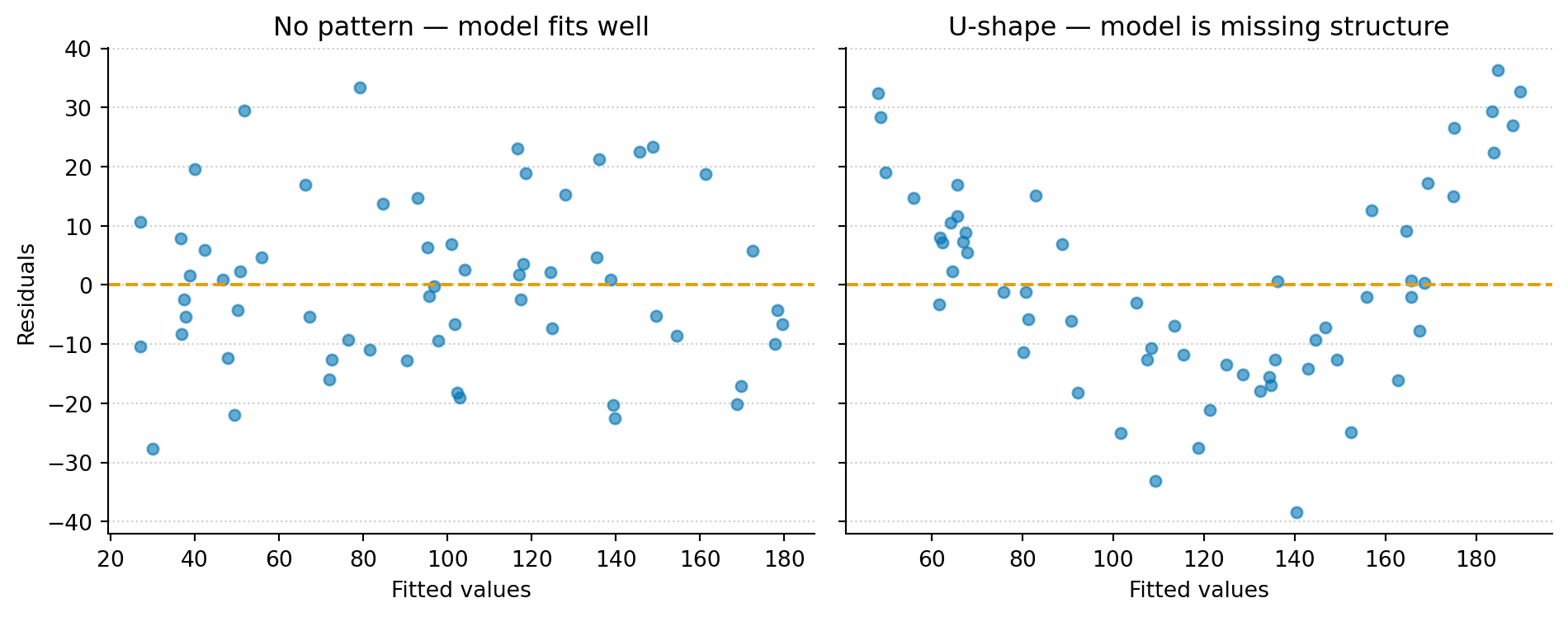
Figure 2: No pattern (left): residuals from a well-specified linear model scatter randomly around zero — healthy noise with no structure. U-shape (right): residuals from a linear model fit to data with a curved relationship show a clear pattern — the model is missing something systematic.
In the left panel, the residuals scatter randomly around zero. No trends, no curves, just noise. The model has captured the systematic relationship, and what’s left is genuinely random.
In the right panel, the same diagnostic applied to a different dataset reveals a clear pattern. The data have a nonlinear component, but the linear model can’t represent it. That missed structure lands in the residuals, where it shows up as a U-shape that shouldn’t be there. The model isn’t wrong in the way a bug is wrong. It’s incomplete. Regression makes assumptions about the noise — independence, constant spread — and different residual patterns flag different violations. The U-shape says the functional form is wrong. A funnel shape (residuals fanning out) says the variance isn’t constant. Clusters say something is grouping your data that the model doesn’t know about. Each pattern points you somewhere specific.
The polynomial trap
Once you spot that U-shape, the curve-fitting instinct kicks in: add more flexibility. A quadratic term, a cubic, maybe a sixth-degree polynomial. Each additional term reduces the residuals on the training data. Keep going and you can eliminate them entirely — two points define a line, three define a quadratic, and in general a polynomial of degree n − 1 passes through n points exactly.
This is the same overfitting problem from Your model is wrong. A model that memorises the training data perfectly has mistaken noise for signal. It scores well on what it’s seen and collapses on anything new. The remedy isn’t to chase a perfect fit. It’s to add flexibility only where the residuals tell you something systematic is being missed, and to stop where the residuals look like noise.
The principle maps to a software intuition: good abstraction means capturing the right amount of structure. Too little and you’re duplicating logic everywhere — underfitting. Too much and you’ve built a framework so specific to today’s requirements that it can’t handle tomorrow’s — overfitting. The residuals help you find the boundary.
What comes next
Everything in this post used a single predictor: payload size. The real power of regression shows up when you add a second.
Suppose you suspect that time of day also affects response time. With one predictor, you can’t tell whether the payload effect is real or whether large payloads simply coincide with peak traffic. With two predictors, regression can separate them — estimating the effect of payload while holding time of day constant, and vice versa. That’s not something curve fitting can do. It’s not even a question curve fitting knows how to ask.
Multiple regression, interaction effects, and the assumptions that hold the whole framework together are where this gets genuinely powerful. The decomposition stays the same. The claims get richer, and so does the scepticism you bring to them.
This article is part of a series drawn from Thinking in Uncertainty, a book that teaches data science to experienced software engineers.